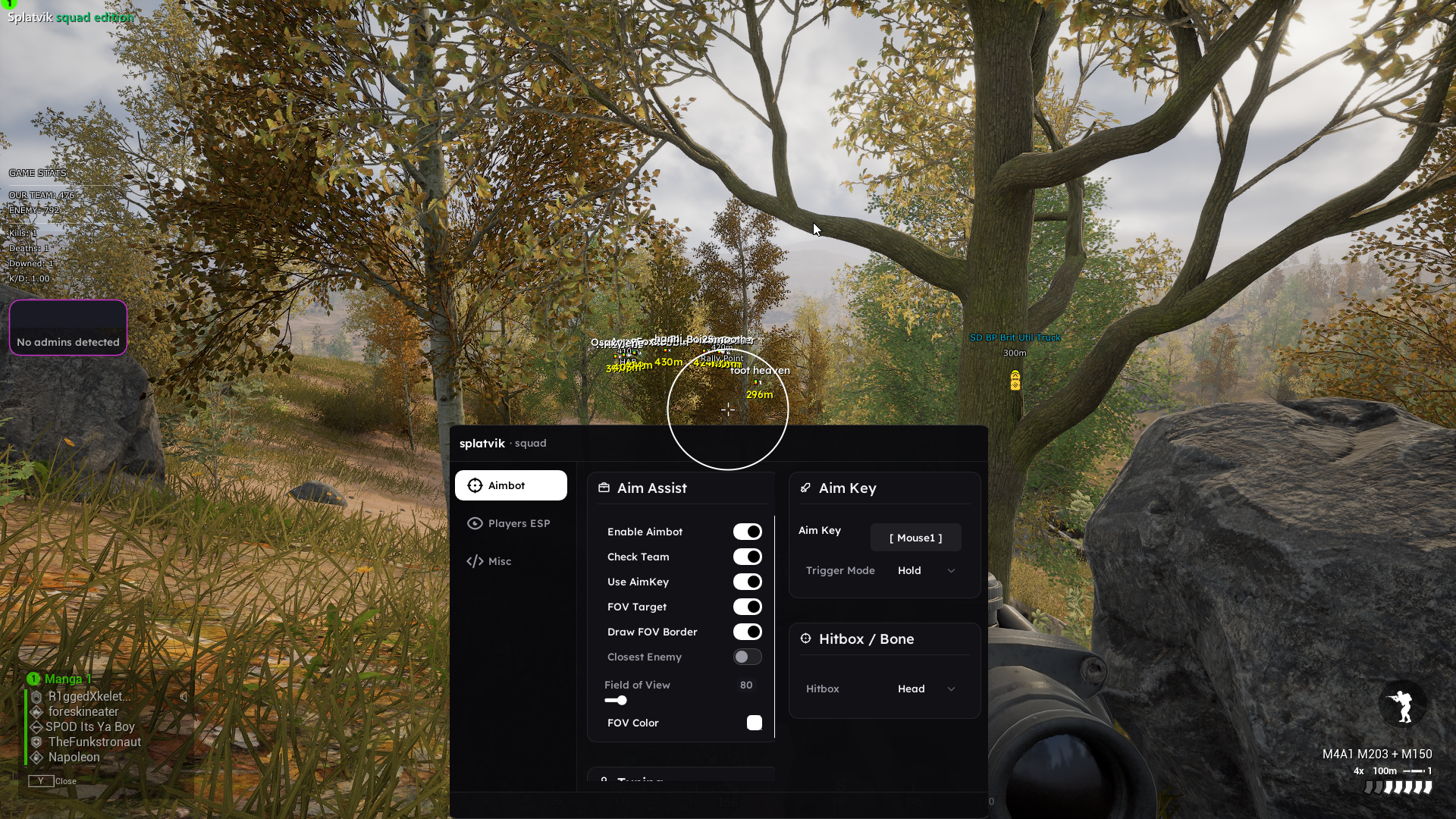
 splatvik
Squad is a 100-player tactical shooter where a single squad leader with good information beats a squad of better shooters with none. That is exactly why a cheat behaves so differently here than it does in a five-versus-five arena shooter — and why the way you configure it matters more than what it can technically do.
This guide walks through every module in the splatvik Squad build, what it reads from the game, and how to set it up so you win rounds without becoming the reason a server admin starts reviewing demos.
What you actually get
The Squad build is a full suite rather than a single feature. At a high level:
| Module | What it does |
|---|---|
| Aimbot | Silent aim with per-hitbox priority, FOV limiting and smoothing |
| Player ESP | Box, skeleton, health, name, distance and squad grouping |
| Vehicle ESP | Type, occupancy count, health and crew role |
| Deployable ESP | FOBs, HABs, radios, repair stations and mines |
| Radar | Standalone 2D overlay with zoom and squad colouring |
| Recoil control | Per-weapon recoil and spread tables, updated each patch |
| Stream proof | Overlay excluded from OBS, Discord, ShadowPlay and Game Bar |
Everything is toggleable in-game from the menu, and every setting saves to a named config so you can keep separate profiles for infantry, armour and logistics runs.
How ESP works under the hood
ESP is not magic and it is not "seeing through walls" in any rendering sense. The game engine already knows where every player is — it has to, because the server replicates that information to your client so the world can be simulated. What a cheat does is read that information out of the game's own memory and draw it somewhere you can see it.
In practice the loop looks like this:
- Walk the actor list that Unreal Engine maintains for the current level.
- Filter it down to pawn objects that represent players and vehicles.
- Read each pawn's world-space position, team id, health and bone transforms.
- Project those world coordinates into screen coordinates using the camera's view matrix.
- Draw a box, a skeleton and a text label at that screen position on our own overlay surface.
That last step is where most providers get lazy. Hooking the game's DirectX present chain is easy, but it means your drawing code runs inside the game process — which is precisely where an anti-cheat is looking. splatvik renders on a separate composited surface instead, which is both safer and why the frame cost stays under two percent.
Distance-scaled ESP matters more in Squad than in almost any other game. At 600m a full skeleton is visual noise. Set skeletons to draw under 150m, boxes under 400m and text labels under 700m, and the screen stays readable.
The settings that actually matter
- Box mode: corner. Full rectangles at 40 players on screen is unreadable. Corner brackets give you the same information with a fraction of the clutter.
- Health bars: on. In Squad you are frequently choosing between two targets. The one already at 40% is the one to shoot.
- Snaplines: off. They add nothing over box position and they are the single most obvious thing on a recorded clip if you ever share footage.
- Vehicle occupancy: on. Knowing an IFV has three crew rather than one changes whether you engage at all.
How the aimbot works
The aimbot has two possible modes and they behave very differently.
Assisted aim moves your actual view towards the target over several frames. It is what most people mean by "aimbot". Because it moves the camera, it is visible in your own recorded footage and in the server's movement telemetry if anyone looks.
Silent aim does not move your camera at all. It corrects the shot vector at the moment the trigger is pulled. Your crosshair stays where you put it. This looks far better on any recording, but it feels less natural to play with because your camera never confirms the target.
Both modes route through the same pipeline:
target selection  →  FOV gate  →  visibility check  →  hitbox pick
       →  ballistic solve  →  smoothing curve  →  apply
The FOV gate is the most important safety setting on the whole product. It defines a cone around your crosshair; anything outside it is ignored entirely. Set it to 30 degrees and you will snap across the screen onto targets you could not possibly have seen. Set it to 6–9 degrees and the aimbot only ever helps with targets you were already roughly aiming at.
The smoothing curve controls how many frames the correction is spread across. A smoothing value of 1 snaps instantly. A value of 4–6 produces a movement that has acceleration and deceleration, which is what a human wrist actually does.
Recommended aimbot configuration
| Setting | Recommended | Why |
|---|---|---|
| Mode | Assisted | Silent aim is safer on paper but harder to play naturally |
| FOV | 7° | Wide enough to help, narrow enough to look intentional |
| Hitbox | Chest | Head-only at range reads as a bot in the killfeed |
| Smoothing | 4.5 | Roughly matches a fast human flick |
| Prediction | On | Squad's bullet travel time is significant past 100m |
| Visibility check | On | Never fire through a wall. Ever. |
That last row is not optional advice. Shooting a target you have no line of sight to is the single fastest way to get reported, because the person who died knows for a fact they were behind cover.
Bullet ballistics and why prediction is on by default
Squad bullets are projectiles, not hitscan. A 7.62 round takes roughly a third of a second to travel 250 metres, and it drops the whole way. Aiming directly at a moving target at that range guarantees a miss behind them.
The prediction module solves the intercept: it reads the target's velocity vector, estimates travel time for your current weapon and range, and offsets the aim point to where the target will be when the round arrives. It uses measured ballistic tables per weapon rather than a single global constant, which is why the tables get re-verified after any patch that touches weapon handling.
Performance
The build was designed around not being noticeable in frametime graphs. On our reference machine — a Ryzen 5 5600 with an RTX 3060 at 1440p, running a 100-player Invasion layer — the numbers look like this:
| Scenario | Average FPS | 1% low |
|---|---|---|
| Clean game | 96 | 71 |
| splatvik loaded, all modules on | 94 | 70 |
That is inside run-to-run variance. The reason is architectural: the overlay is composited outside the game's render loop, and the memory reads happen on a throttled worker rather than every frame.
Safety, updates and detection
Squad runs Easy Anti-Cheat. EAC does three things that matter here: it scans loaded modules, it validates the integrity of the game's own memory, and it periodically ships new detection heuristics without warning.
Our answer to each:
- Module scanning — the build is manual-mapped, so there is no module entry to enumerate.
- Integrity checks — we do not patch game memory. Everything is read-only except the aim vector, which is applied at input level.
- New heuristics — this is the one nobody can fully pre-empt, which is why the status system exists.
When EAC updates, the product status on the site flips to Updating automatically, sales pause, and the loader refuses to inject. That last part matters: it means you physically cannot run a stale build during the risk window even if you want to. When our developers push the rebuilt version, status flips back to Undetected and every day of downtime is credited to active subscriptions.
You can watch that happen live on the status page, which is written straight from our development channel.
Using the loader
The loader is a single signed executable, roughly 4MB.
- Disable Secure Boot in your BIOS (the setup guide walks through this per motherboard vendor).
- Pause real-time antivirus protection — the loader is a driver-mapping tool and every AV flags those generically.
- Run the loader as administrator.
- Paste your key. It binds to your hardware on first use.
- Launch Squad, wait for the main menu, press Inject.
- Open the menu in-game with the Insert key.
If injection fails, the loader tells you why rather than silently closing. The three common causes are Secure Boot still enabled, the game being launched before the loader, and an antivirus that resumed protection automatically.
Frequently asked questions
Is it undetected right now? Check the status page — it is written directly from our dev channel and reflects what our developers see, not what our marketing team wants you to read.
Will it work on modded and community servers? Yes. The build hooks the local client, so server-side mods and admin tools make no difference.
Can I get banned for using it? Any cheat carries risk. What we control is the technical exposure, and we control it well. What we cannot control is you headshotting eight people through a wall in ninety seconds. Configure conservatively.
Does it work with a controller? The aimbot applies at the input layer and works with controller input, though smoothing values need to be roughly doubled to feel natural.
How many PCs can I use one key on? One at a time. Each key is HWID-bound, with one free reset every 14 days from your dashboard.
Ready to try it? The Squad product page has the full feature list, live status and current pricing.
Founder & lead developer — part of the splatvik team since 2023.
Related articles.
Hell Let Loose cheats: ballistic aimbot, armour ESP and reading a 100-player battlefield
Hell Let Loose has real bullet drop, 800-metre engagements and armour that dies to one shot in the right place. Here is how the splatvik build handles all three.
Dead by Daylight cheats explained: aura ESP, auto skill checks and how not to get reported
Dead by Daylight is an information game, and information is exactly what a cheat provides. Here is every module in the splatvik DBD build, how each one works, and the settings that keep you off the report radar.
ESP explained: what a wallhack actually reads, and why it barely costs any frames
A technical walkthrough of how ESP is implemented — actor lists, view matrices, world-to-screen projection and overlay compositing — written for people who want to know what they are actually buying.