 splatvik
Every module, explained.
What each feature does, how to configure it, and what the settings actually change. Written for people who want to understand what they bought.
What splatvik is
splatvik builds private cheat software for a small number of PC games. Each product is written against one title — its engine, its ballistics, its anti-cheat surface. Nothing is ported between games, because a ported build does every job badly.
Every product ships as a payload delivered by a shared loader. The loader authenticates your licence, checks the live product status, fetches your per-user signed build and maps it into the game process. Nothing is written to disk between sessions.
Account and licences
One account can hold any number of licences. Each licence covers one product and binds to one machine.
Licences appear in your dashboard with their key, expiry date and HWID state. Renewing does not issue a new key — the existing key's expiry extends.
The status gate
Every product has a live status: undetected, updating, maintenance, detected or offline.
The loader refuses to inject unless status reads undetected. This is enforced at the loader and has no override, deliberately. It exists so that nobody — including people who really want to — can run a build during a detection window.
ESP
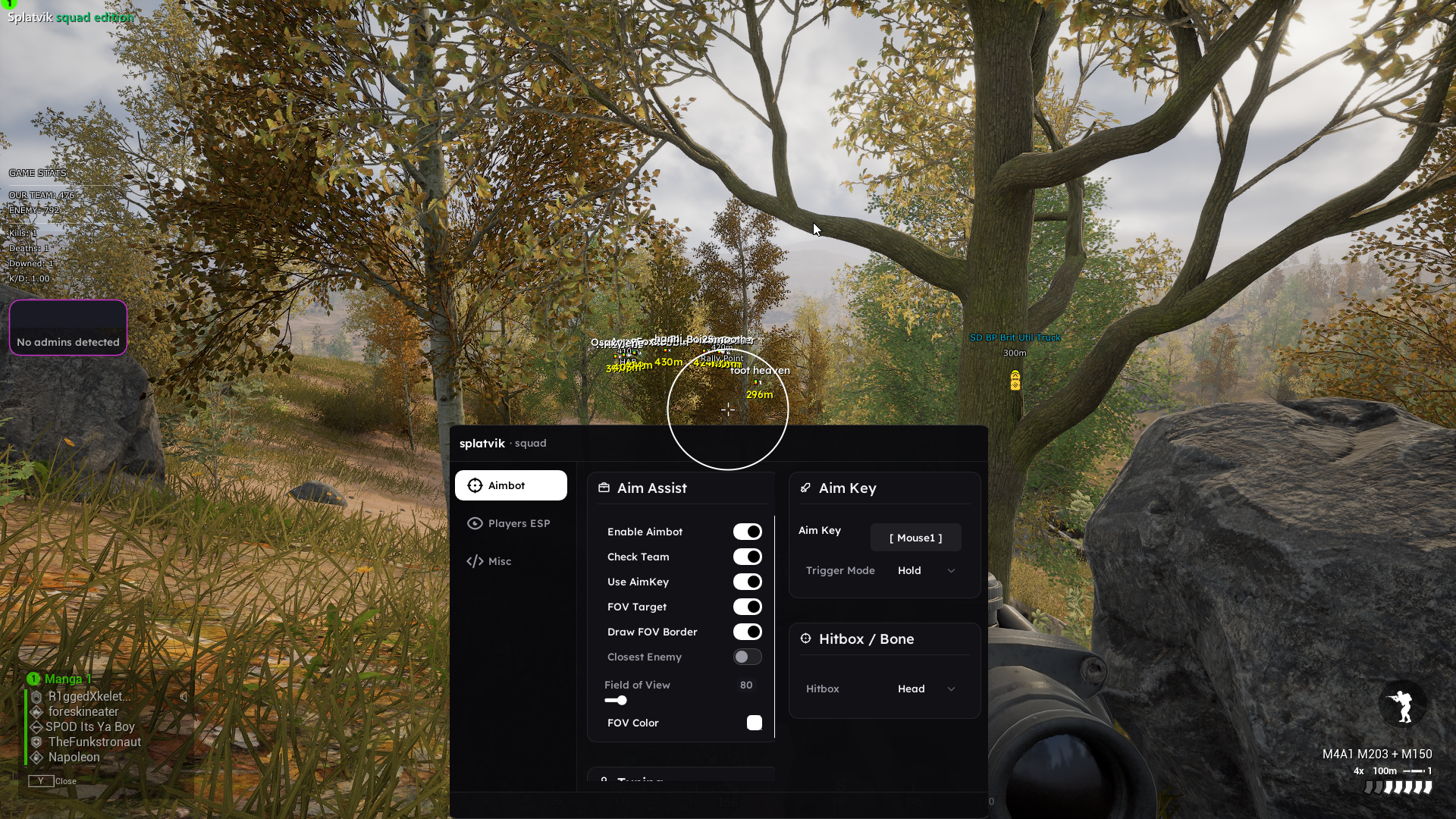
ESP reads player, vehicle and object state out of the game's own memory and draws it on an overlay.
Key settings
| Setting | Effect |
|---|---|
| Box mode | full draws a rectangle, corner draws brackets only |
| Skeleton | Bone lines. Expensive to read visually — limit by distance |
| Health | Vertical bar beside the box |
| Distance | Metres, below the box |
| Snaplines | Line from screen bottom to target. Off by default |
| Max distance | Per-element distance cut-off |
Distance scaling is the setting that matters most. Drawing forty full skeletons is noise that makes you play worse.
Aimbot
Two modes:
- Assisted moves your view towards the target over several frames. Feels natural, visible in your own recordings.
- Silent corrects the shot vector at fire time without moving your camera. Invisible on recordings, harder to play with.
The pipeline is: target selection → FOV gate → visibility check → hitbox pick → ballistic solve → smoothing → apply.
The two settings that keep you safe
- FOV — a cone around your crosshair. Anything outside is ignored. Keep it under 10°.
- Smoothing — how many frames the correction spreads over. Keep it above 4.
Leave the visibility check on. Firing through a wall is the single most reportable thing a cheat can do.
Recoil and spread
Per-weapon tables measured in-game rather than derived from published stats, because the two do not always agree.
Reduction is a percentage rather than a toggle. Setting it to 100% produces a laser beam that is instantly obvious in a killcam; 60–75% is enough to be a real advantage while still looking like good recoil control.
Radar
A standalone 2D overlay showing player positions relative to you. Configurable zoom, size, position and squad colouring.
The radar is arguably the safest module in any product — it shows only information the ESP already has, in a form that never appears in a killcam.
Stream proof
Excludes the overlay from screen capture at the window composition layer, which covers OBS, Discord, ShadowPlay, Windows Game Bar and any capture tool that uses the standard paths.
Note the exception: in Dead by Daylight, aura ESP renders through the game's own path and is captured. Do not stream with aura ESP on.
Configs
Settings save to named profiles. Profiles sync to your account, so a fresh install or a new machine restores everything.
F1–F4 cycle the first four saved configs in-game without opening the menu — useful for switching between infantry and armour roles mid-match.
Authentication
Paste your key, press Authenticate. The loader validates against our API and displays HWID state, build version, expiry and live status.
Keys are never logged in plaintext and are transmitted over HTTPS only.
HWID binding
Your key binds to a one-way hash of three stable hardware identifiers on first use. We never store anything that identifies your actual hardware — only whether a machine matches.
Reset from your dashboard: one free reset every 14 days, instant, no ticket. Need more because you genuinely test across machines? Open a ticket and explain.
Keybinds
| Key | Action |
|---|---|
| Insert | Open / close the menu |
| End | Panic key — unload everything |
| Delete | Toggle overlay without unloading |
| F1–F4 | Cycle saved configs |
All rebindable in the menu.
Errors
| Message | Cause | Fix |
|---|---|---|
| Secure Boot must be disabled | Unsigned driver blocked | Disable in BIOS |
| Process not found | Game not running or launched late | Loader first, then game, then Inject |
| Key already bound | HWID mismatch | Reset HWID in the dashboard |
| Status: updating | Build being rebuilt | Wait — the status page is live |
| Licence expired | Subscription ended | Renew from the dashboard |
Payment methods
Card, Apple Pay and Google Pay through our checkout provider, plus crypto (BTC, ETH, LTC, USDT and others). Crypto is credited automatically after one network confirmation.
All prices are in USD.
Renewals
Renewing extends the expiry on your existing key. You do not receive a new key and you do not need to re-bind your hardware.
Renew early and the remaining days carry over — nothing is lost.
Downtime credit
If a build's status is anything other than undetected, active subscriptions accrue credit for the affected period. It is applied automatically when the build returns; you never need to ask.
Downtime over 48 hours qualifies for a refund on request under the refund policy.
Coupons
Enter a coupon at checkout. Codes may be limited to a specific product, a number of uses or an expiry date. Only one code applies per order.
Public endpoints
A small read-only API is available for status integrations.
GET /api/status              → all product statuses
GET /api/status/:game        → one product
GET /api/changelog?game=squad → changelog entries
GET /api/live                → server-sent event stream
No authentication is required and there is no rate limit beyond a generous per-IP throttle. If you build something with it, we would like to see it.
Live updates
/api/live is a Server-Sent Events stream. Every status change, changelog entry and notification is pushed as it happens.
const es = new EventSource('/api/live');
es.onmessage = (e) => {
  const { type, payload } = JSON.parse(e.data);
  if (type === 'status') console.log(payload.game, payload.status);
};
This is what makes the status page update without a refresh.