Create an account & sign in
Click Sign In / Register at the top-right of the store and create your account. Your purchases and license keys are tied to this account.
From purchase to in-game in under a minute. Pick a category on the left.
64-bit Windows. Other operating systems are not supported.
Disable Windows Defender / your antivirus, or add the loader as an exclusion.
Buy a plan on the store — your license key is generated instantly.
The loader verifies your license online every time you launch.
Click Sign In / Register at the top-right of the store and create your account. Your purchases and license keys are tied to this account.
On the home page, select a game, choose a duration plan (e.g. 1 Day, 30 Days or Lifetime) and click Buy. A license key is created for you instantly — no waiting.
Open Account (top-right) → My products & keys. Find your purchase and press Copy to copy the key. It looks like SPL-XXXX-XXXX-XXXX-XXXX.
In the same account panel, click ⬇ Download Loader. Save the file somewhere easy to find, like your Desktop.
All game cheats are detected as "threats" by antivirus software — this is a normal false positive. Turn off Windows Defender real-time protection (or add a folder exclusion), then extract the downloaded .zip.
Right-click the loader and choose Run as administrator. When prompted, paste your license key and confirm. The loader locks the key to this PC on first use.
Once the loader shows authenticated, start your game. Wait for the menu to load in-game, then enjoy. Keep the loader open while you play.
The first machine that runs your key locks it to that computer's hardware ID. Using the key on a different PC will fail with HWID mismatch. If you changed hardware or want to move the key, contact support for a free HWID reset.
If you are using the Unturned cheat: the Assets folder comes inside the loader's .rar archive. Extract that Assets folder STRICTLY to the root of your C:\ drive. Just move the folder, do not rename anything.
Extract the loader to your desktop and rename the file EXACTLY to your license key received after purchase.
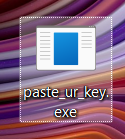
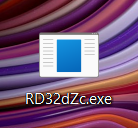
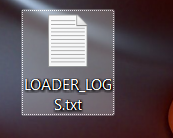
If you receive an error stating that a driver cannot load on this device:
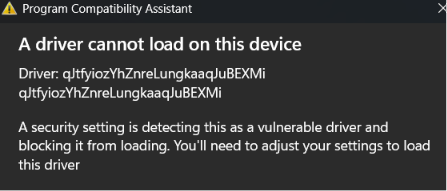
For the loader to work correctly, you must completely uninstall all virtual machines (VMware, VirtualBox, etc.) from your system.
Ensure that Vanguard and Faceit anti-cheats are completely uninstalled. If you don't know how to uninstall them or disable protection, ask AI or search online. Restart your PC after uninstalling.
Uninstall all third-party antiviruses. In the user panel (Programs tab), download Defender Control to completely disable Windows Defender.
Make sure you copied the whole key, including the SPL- prefix and all four blocks, with no extra spaces. Re-copy it from your account panel and paste again.
Your key is already locked to another PC. This is the anti-share protection. Reach out on Telegram or Discord and we'll reset the HWID for you.
Your plan's duration has ended. Head back to the store and purchase a new plan to get a fresh key. Lifetime plans never expire.
That's an expected false positive for this kind of software. Disable real-time protection or add an exclusion for the loader's folder, then download and extract it again.
Run it as administrator, make sure the game is fully closed first, and install the latest Visual C++ Redistributable if prompted. Then try again.
It never disappears — sign in and open Account → My products & keys. Every key you've purchased is listed there.
Real humans on Telegram and Discord, ready to sort out keys, resets and setup — usually within minutes.